


If you went live on NetSuite more than a year ago, your instance probably looks very different from what you designed in the project plan.
New fields, one-off customizations, extra roles, and "temporary" saved searches have a way of becoming permanent. Over time, that bloat slows performance, frustrates users, and inflates your license costs.
NetSuite optimization is the discipline of tuning configuration, data, customizations, and licensing so the system runs faster, is easier to use, and stays aligned to your business today rather than the business you had at go-live. This guide covers practical tactics, a 90-day roadmap, and real before/after data.
By the 12 to 24 month mark, most NetSuite environments show the same patterns.
Dashboards load slowly because they are crammed with real-time searches, charts, and Key Performance Indicator (KPI) portlets that query large datasets on every refresh.
Workflows have proliferated into overlapping logic that nobody fully understands and that nobody feels safe deleting.
Saved searches have multiplied with many doing almost the same thing, some running constantly in the background on a schedule.
Roles were added for edge cases and never revisited, leading to license creep and compliance risk.
Licensing does not match usage with some users hardly logging in while others need access that their license does not cover.
The good news: every one of these patterns is fixable.
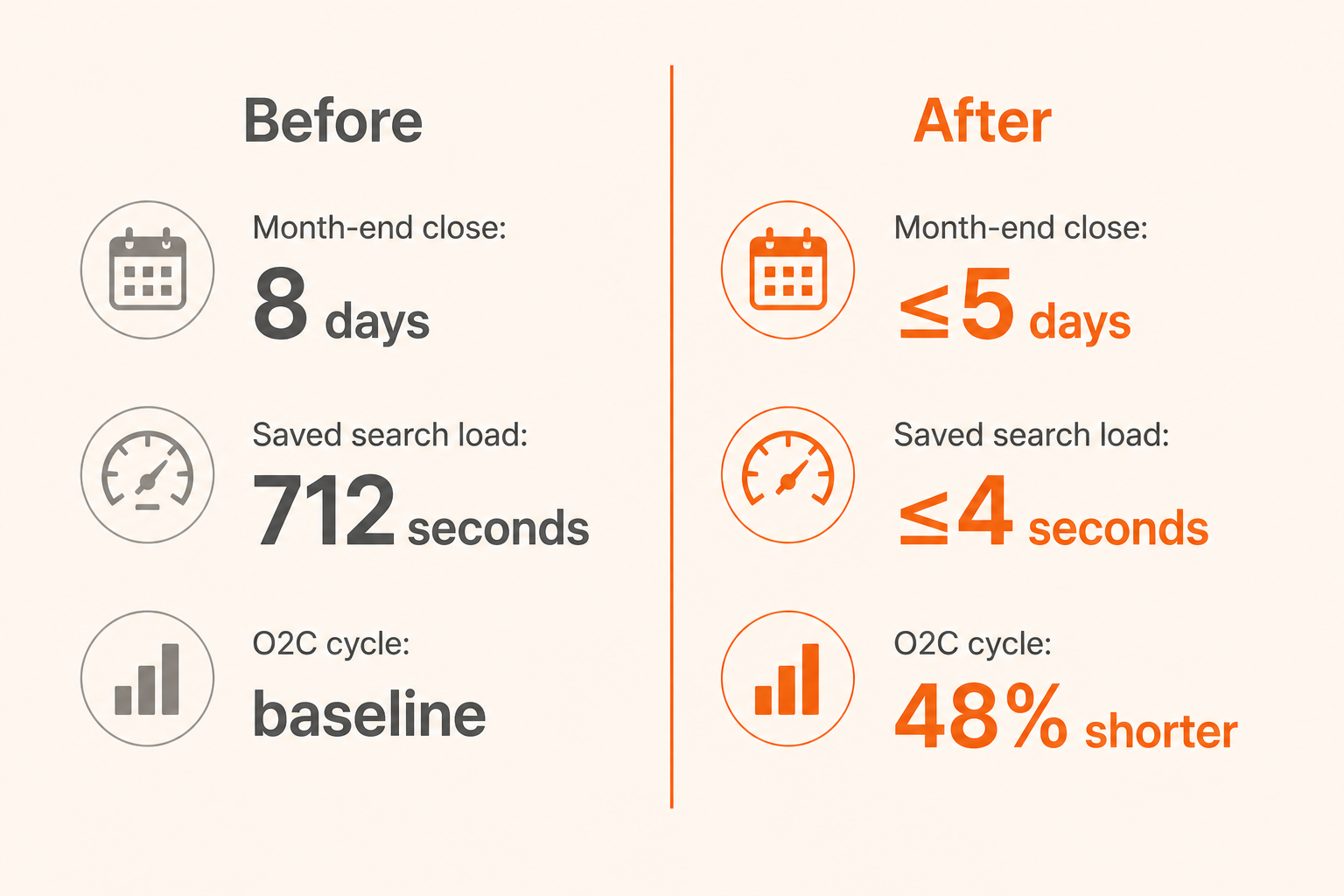
Done well, a structured optimization effort delivers measurable results. In one engagement, a manufacturing company that we worked with reduced their month-end close from 8 days to under 5 days and cut saved search load times from an average of 712 seconds to under 4 seconds, without re-implementing NetSuite. Their end-to-end Order-to-Cash (O2C) cycle shortened by 48%. Finance regained 12 working days every month.
Before tuning anything, you need a clear view of where performance and usability are suffering. Diving straight into changes without a diagnostic wastes effort on symptoms rather than causes.
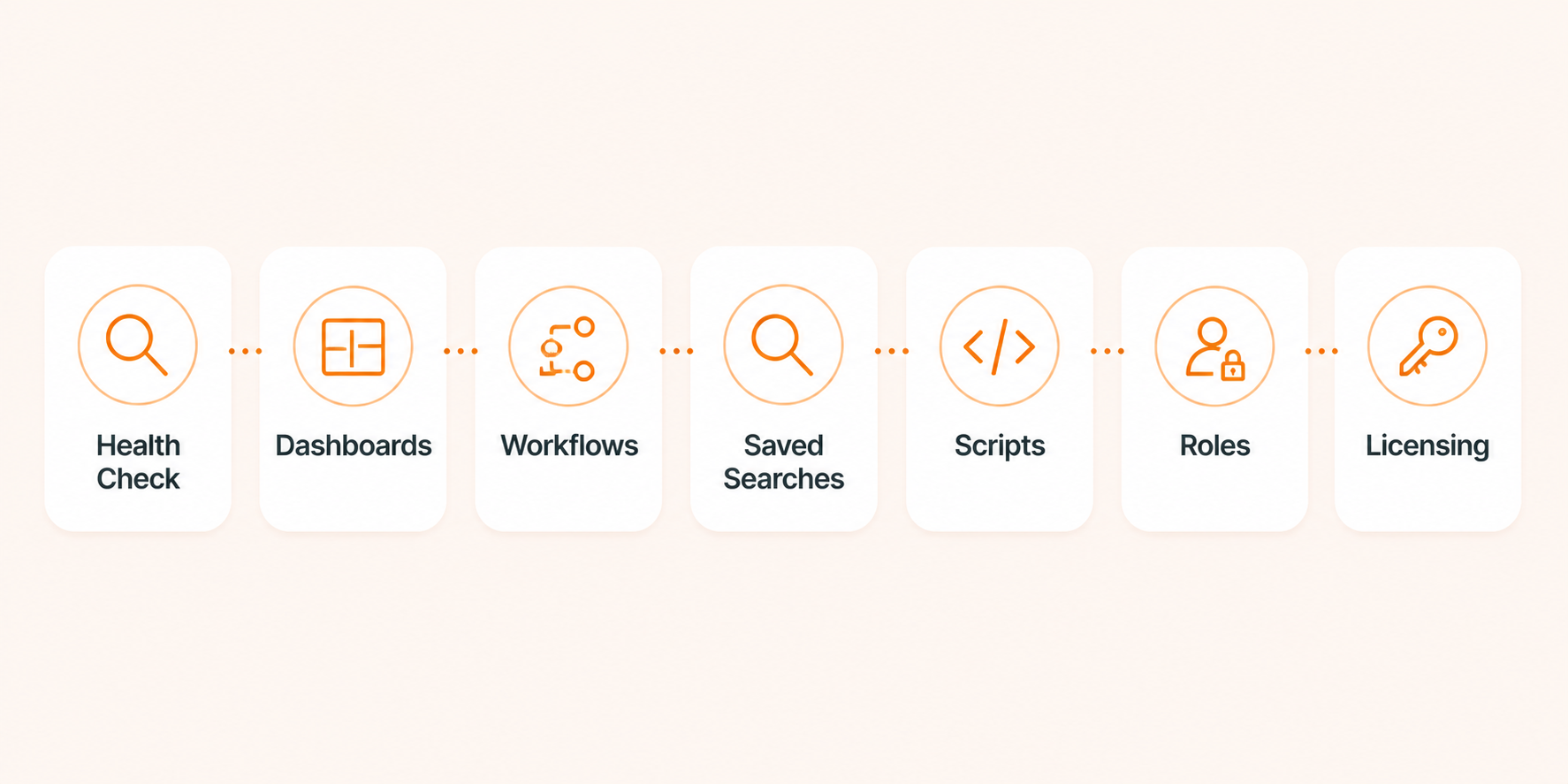
A structured health check covers:
 Performance
Dashboard and page load times for key roles
Script execution logs and performance detail logs
Scheduled search and script run frequency and duration
Customization InventoryAll workflows: record type, trigger, state count, purpose
All scripts: SuiteScript version, deployment status, last use
Custom fields, forms, and records
Data QualityRecord counts and growth trends
Duplicates, inactive records, aged open transactions
Pending approvals that have sat untouched for months
Security and LicensingAll roles, assigned users, and permission scope
License types assigned vs actual usage patterns
Modules enabled vs actively used
 Example
Before: A distribution company's health check uncovered approximately 2,000 unused vendor records (zero transactions), 476 potential duplicate vendors out of 10,000 total, and 940 transactions pending approval for months. None were visible in daily operations, but all were affecting system performance and data integrity.
After: Softype provided saved searches, playbooks, and mass-update templates. The client executed the cleanup, removing inactive vendors, merging duplicates, and closing aged pending approvals. Data quality improved across procurement and financial reporting.
Softype uses Scout, our NetSuite environment diagnostic tool, to automate much of the health check assessment. Scout covers data quality, configuration drift, script execution analysis, saved search optimization, and governance usage, producing a quantitative baseline that guides every recommendation that follows.
For a full discussion of what happens when a health check reveals deeper problems, see our NetSuite Recovery guide.
Dashboards are often the first thing users blame when NetSuite feels slow. They are also one of the fastest areas to improve.
Common ProblemsToo many portlets, especially those backed by real-time searches or charts
KPI scorecards that query large datasets on every login
Multiple dashboards per role that nobody actually uses
Heavy analytical portlets that belong in a scheduled report, not on a homepage
Optimization ActionsKeep each dashboard to roughly 5 to 7 portlets for primary roles
Limit graphs to around 5 and report portlets to around 10 per dashboard
Collapse heavy portlets by default so they only load when expanded
Replace complex real-time reminders with scheduled saved searches that run off-peak
Remove dashboards assigned to roles no one holds, or that duplicate other dashboards
Make dashboards role-specific: show only what that role needs to see daily
ExampleBefore: A sales manager dashboard had 14 portlets, 9 real-time KPI scorecards, and 6 graphs, many scanning all subsidiaries for the current fiscal year. Load time: 18 to 25 seconds at login.
After: Trimmed to 7 portlets, heavy analytics moved to a scheduled saved search accessible via shortcut. Load time: 6 to 8 seconds.
SuiteFlow is powerful but easy to overuse. Over time, workflow sprawl introduces processing delays and troubleshooting debt.
Common ProblemsRecords take several seconds to save even with minimal data changes
Users see inconsistent field updates or duplicate email notifications
Multiple workflows trigger on the same record and event
Nobody can explain what a given workflow does or confirm it is still needed
Optimization ActionsBuild a complete workflow inventory: record type, trigger (create/edit/view/approve), state count, action list
Identify workflows that overlap in purpose or fire on the same events
Consolidate redundant actions into single states where possible
Move non-essential heavy logic (bulk updates, notifications) to scheduled scripts rather than real-time workflows
Disable obsolete workflows using a naming convention ("ZZZ - Deprecated - Do Not Use") before fully removing them, and always test in sandbox first
Assign each workflow a business owner and technical owner responsible for its purpose going forward
ExampleBefore: A sales order workflow triggered on every create and edit, setting fields, sending three approval emails, and creating a follow-up task on every minor change. Average save time: 7 to 10 seconds.
After: Split into a lightweight create workflow and a scheduled batch script for notifications. Save times dropped to 3 to 4 seconds.
Saved searches are often the hidden engine of NetSuite slowdowns because they run inside dashboards, reminders, workflows, scripts, and on schedules, sometimes all at once.
Common ProblemsRedundant searches doing nearly the same thing for slightly different audiences
Broad criteria with no date boundaries scanning entire transaction histories
Complex formulas and joins running in real time on dashboards
Scheduled searches running every 15 minutes during peak hours
Optimization ActionsList your top 50 to 100 saved searches by average run time and frequency
Add date filters where appropriate (last 365 days rather than all history)
Avoid unnecessary joins: if you only need header data, do not pull all line-level details
Consolidate searches that differ only by minor filters into a single search with audience criteria
Archive searches not run in the last 90 to 180 days
Move heavy searches off dashboards and schedule them to run off-peak, delivering results via email or a lighter summary portlet
ExampleBefore: Ten similar Accounts Receivable (AR) aging searches existed, each embedded in different dashboards, all scanning full history without date filters, some running every 15 minutes.
After: Two standardized searches (summary and detailed) with clear date ranges, scheduled hourly off-peak. Average load time dropped from approximately 712 seconds to under 4 seconds. This was one of the highest-impact single optimizations in a post-go-live engagement.
This is the optimization area most companies ignore until a deadline forces action. Oracle is deprecating SuiteScript 1.0 in the 2027.1 release. Scripts running on legacy 1.0 will stop working.
Common ProblemsLegacy SuiteScript 1.0 scripts still running in production, facing deprecation in 2027
Abandoned or orphaned scripts consuming processing overhead even when idle
DEBUG log level left on in production deployments, generating unnecessary log volume and slowing execution
Unused custom records, fields, and forms accumulating alongside scripts with no cleanup process
Optimization ActionsAudit all scripts: version (1.0 vs 2.x), deployment status, last execution, purpose, and owner
Classify as: critical (business-stopping if removed), active support (in use, lower risk), or abandoned/orphaned
Undeploy abandoned and orphaned scripts immediately: they consume processing overhead even when idle
Plan SuiteScript 1.0 to 2.x migration for all critical scripts before 2027, prioritizing those that run on high-volume records
Remove DEBUG log level settings from production scripts: many deployments run in DEBUG by default, generating unnecessary log volume and slowing execution
Inactivate unused custom records, fields, and forms that accumulate alongside scripts
ExampleBefore: A script audit identified 77 scripts still running on SuiteScript 1.0 out of 114 total implementor-built scripts. 45% of deployments were running DEBUG log level in production.
After: Scripts were classified as critical, active support, or abandoned. Abandoned scripts were undeployed immediately. A migration roadmap was created for the remaining 1.0 scripts, prioritized by business impact, ahead of Oracle's 2027.1 deprecation deadline.
Over time, roles multiply. Someone needed a slightly different view, so a new role was cloned. Someone left, and their role stayed. Without cleanup, the result is confusion, security risk, and inflated license costs.
Common ProblemsToo many roles with vague or generic names ("Custom Role 1," "Copy of Admin")
Users assigned to multiple roles to cover edge-case tasks, creating permission overlaps
Broad permissions that exceed actual job requirements, increasing compliance and audit risk
Departed employees' roles still active, consuming license allocations
Optimization ActionsExport all roles, their permissions, and assigned users
Define standard role archetypes by function: Accounts Payable (AP) Clerk, AR Clerk, Staff Accountant, Sales Representative, Operations Manager, Executive
Consolidate overlapping roles into the standard archetypes
Remove roles with no active users
Tighten permissions for roles that have broader access than their function requires
Use workflow approval rules to gate sensitive approvals rather than creating new roles for each approval nuance
Ensure appropriate segregation of duties for finance and purchasing functions
ExampleBefore: One client had 42 active roles, many with generic names like "Custom Role 1," and several users assigned to five or more roles each.
After: 14 standard roles aligned to job functions, users assigned one to two roles each, elevated permissions handled via workflow approvals.
Licensing is where optimization translates directly into cost savings. NetSuite uses subscription-based licensing with fees based on edition, user licenses, and modules. Over time, organizations often keep paying for users and modules they no longer need.
Common ProblemsFull licenses assigned to users who log in only a few times per year
Modules enabled for pilots that never scaled but still appear on the invoice
No usage review ahead of contract renewal, leaving the vendor to set terms
License counts that have only ever grown, never been reduced
Optimization ActionsIdentify users who rarely or never log in (monthly login reports are your starting point)
Match users to appropriate license types: full licenses for daily users, lighter options for infrequent or self-service users
Review all active modules against actual usage: if a module was enabled for a pilot that never scaled, it is costing you money
Start your license review 6 to 9 months before contract renewal so you are prepared when Oracle or your partner initiates the renewal conversation (typically 120 to 190 days before expiration)
Document your usage data as leverage in renewal negotiations
ExampleBefore: A company with 90 full licenses found that approximately 30 users logged in only a few times per year. Two modules were technically enabled but no active process used them.
After: They moved infrequent users to lighter access options and dropped the unused modules at renewal, producing meaningful annual savings.
For context on NetSuite subscription cost structures, see our NetSuite Pricing 2026 guide.
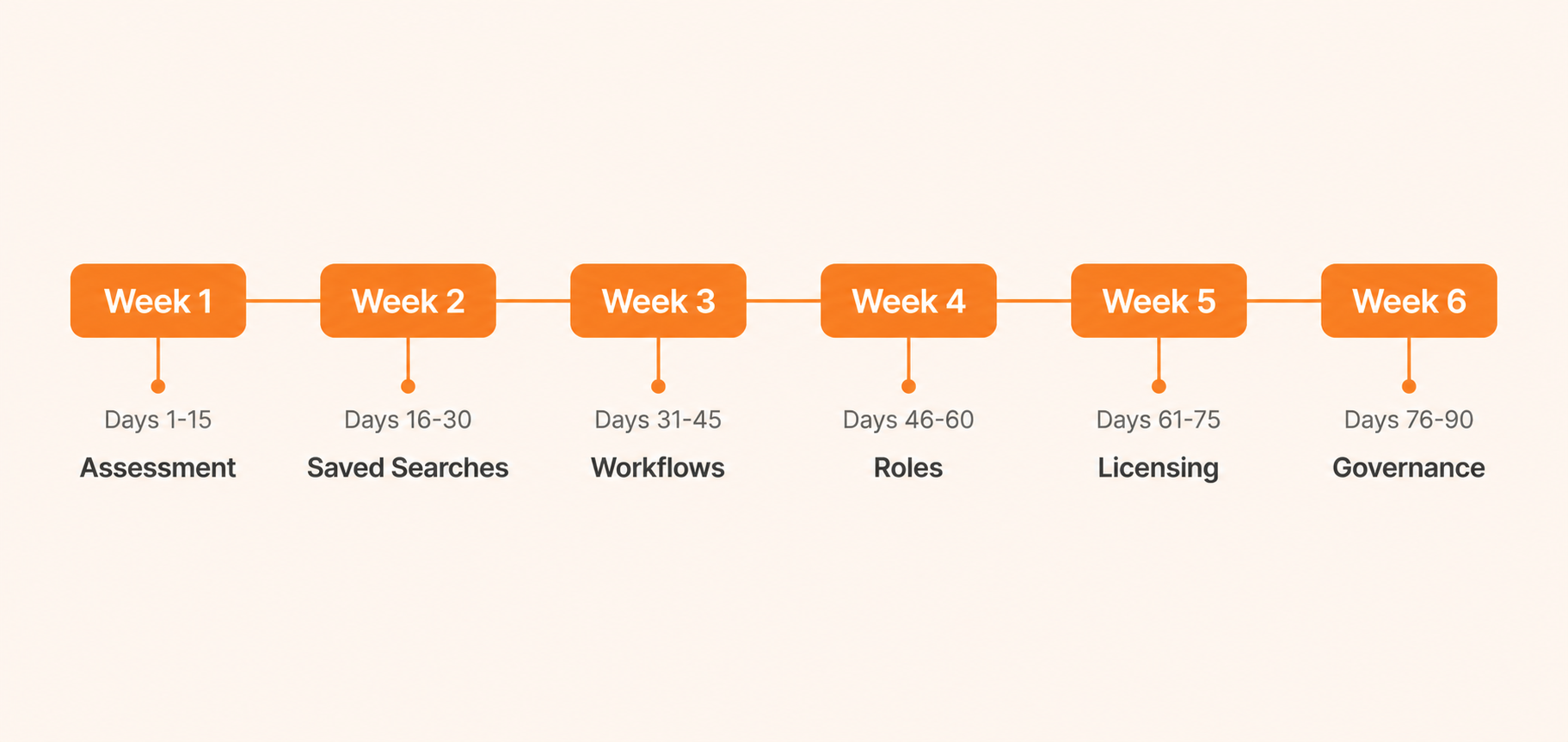
Phase | Days | Focus | Key Activities |
|---|---|---|---|
Assessment | 1-15 | Health check and quick wins | Health check, user interviews, dashboard cleanup for finance and sales |
Saved searches | 16-30 | Search inventory and tuning | Inventory, tighten filters, consolidate, adjust dashboard dependencies |
Workflows | 31-45 | Workflow cleanup | Inventory, simplify high-impact workflows, sandbox testing, phased deployment |
Roles and security | 46-60 | Role consolidation | Standard archetypes, permission tightening, license mapping |
Licensing | 61-75 | License right-sizing | Usage analysis, module review, draft renewal strategy |
Governance | 76-90 | Continuous improvement setup | Quarterly review cadence, 6 to 12 month enhancement roadmap |
 Assessment
Run a health check across performance, customizations, data quality, and security
Identify top 10 to 15 user pain points from interviews and support tickets
Inventory all workflows, scripts, saved searches, roles, dashboards, and active modules
DashboardsReduce each key dashboard to 5 to 7 portlets
Remove or collapse heavy portlets; move analytical reports to on-demand or scheduled views
Align dashboards strictly by role with clear ownership
WorkflowsDocument all workflows with trigger, state count, and business purpose
Simplify or consolidate workflows with too many states or overlapping triggers
Disable obsolete workflows after sandbox testing with rollback documentation
Saved SearchesIdentify top 50 searches by run time and frequency
Tighten date filters and remove unnecessary joins
Consolidate redundant searches; schedule heavy ones off-peak
ScriptsAudit all scripts for version (1.0 vs 2.x), status, and purpose
Undeploy abandoned and orphaned scripts
Plan SuiteScript 1.0 migration before 2027
Roles and SecurityDefine standard role archetypes and consolidate overlapping roles
Tighten permissions; enforce segregation of duties for finance
LicensingAnalyze login and usage data by user
Match users to appropriate license types
Start renewal review 6 to 9 months before contract expiration
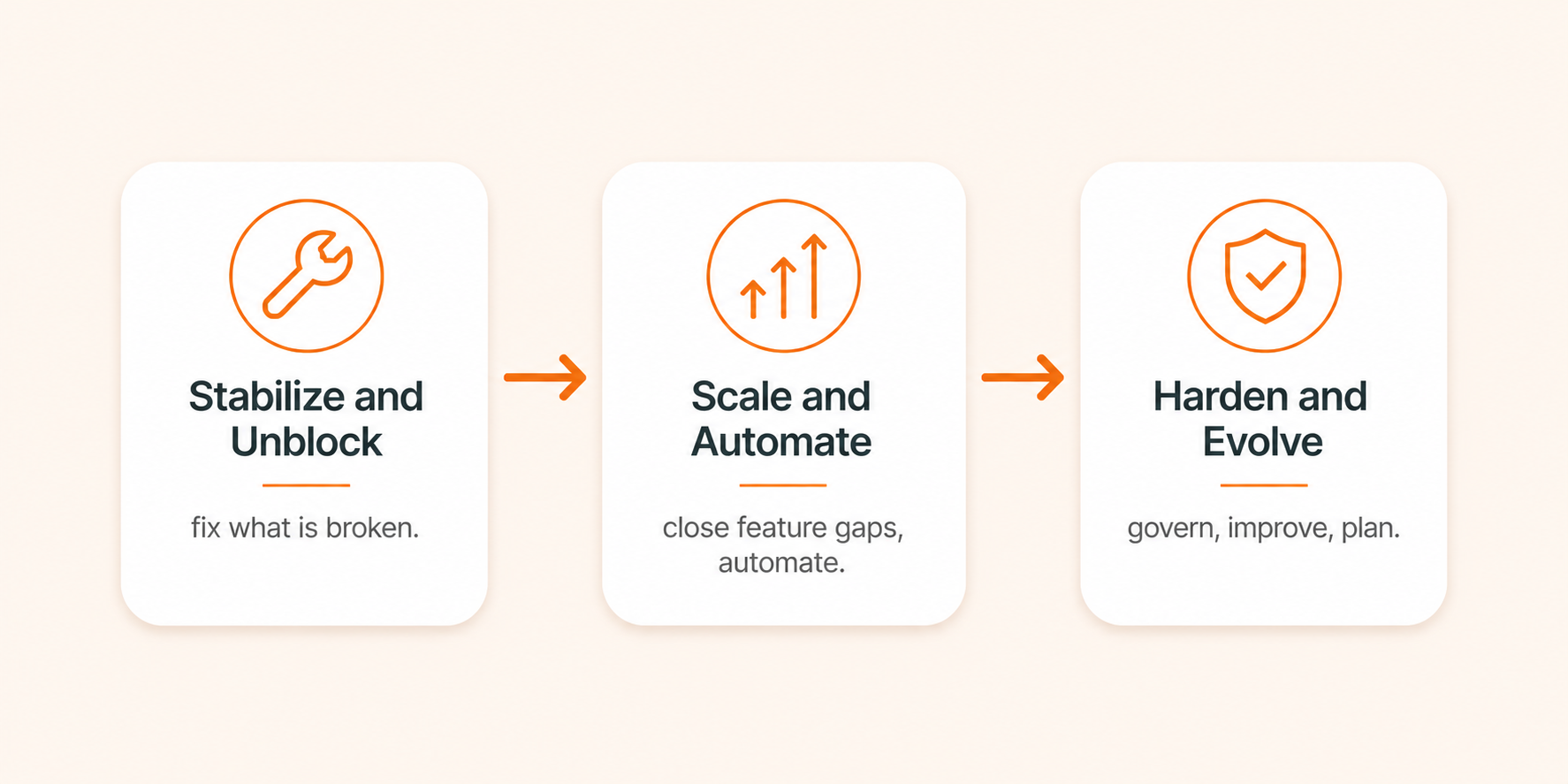
Softype approaches NetSuite optimization using a three-phase framework:
Stabilize and Unblock (fix what is broken and slowing daily operations),
Scale and Automate (close feature gaps, automate manual processes, build reporting), and
Harden and Evolve (govern configuration, continuously improve, plan the next enhancement wave).
We conduct annual optimization assessments as part of managed services engagements, using a quantitative health check methodology that scores environments across standard feature utilization, advanced module adoption, customization governance, and hygiene. Scores below 30% indicate the need for significant intervention. Scores above 70% indicate a well-maintained environment.
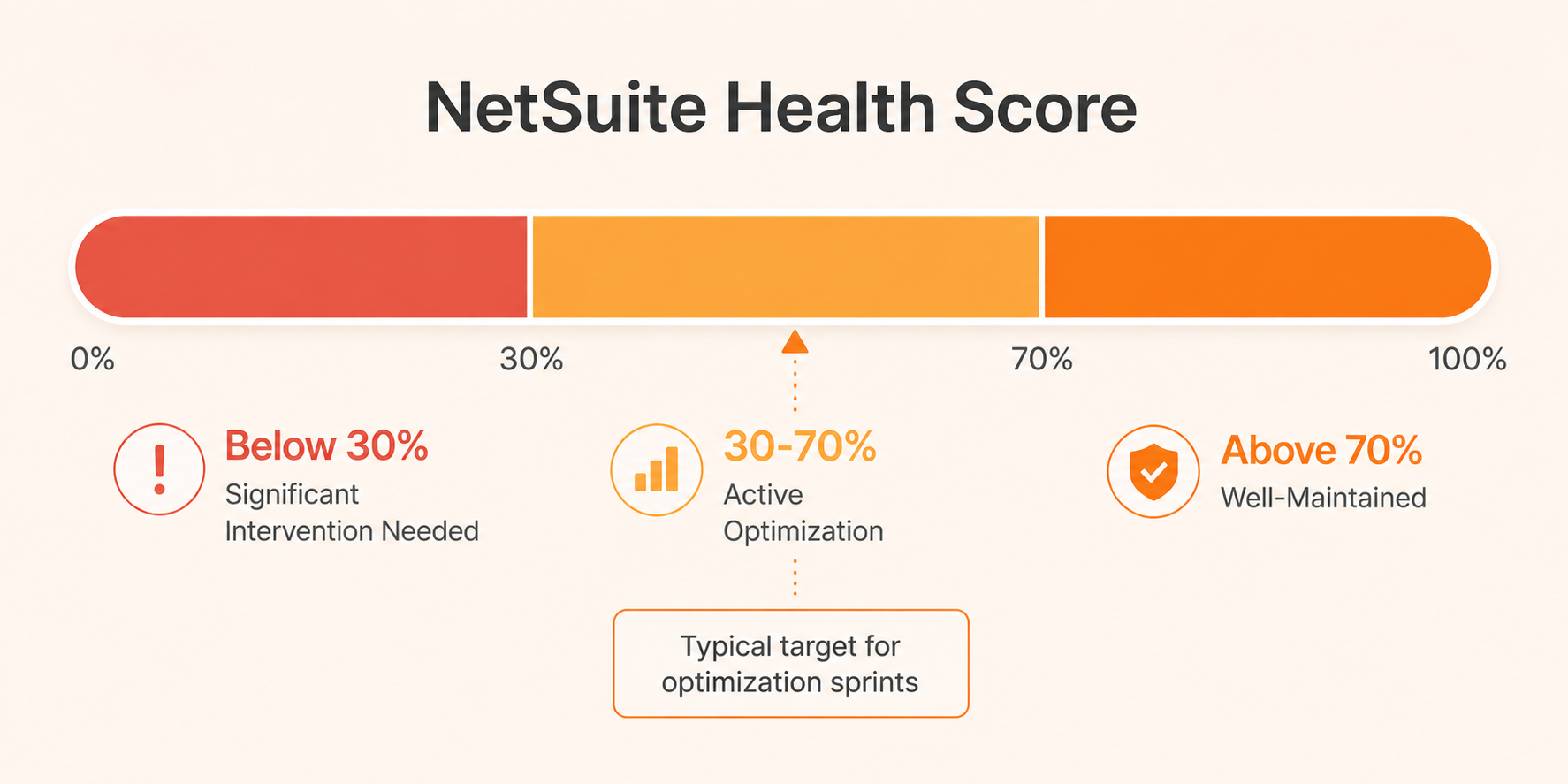
Softype also offers standalone optimization sprints for organizations that are not on a managed services arrangement. A typical sprint runs 4 to 12 weeks depending on scope.
For organizations whose NetSuite environment has deeper structural problems, see our NetSuite Recovery guide for a diagnostic and re-implementation framework. For context on where optimization fits in the broader implementation journey, see our NetSuite Implementation Guide. For more on Scout, our AI-powered diagnostic analyst, see visit here.
Talk to Softype about an optimization assessment for your NetSuite environment.

NetSuite optimization is the ongoing process of tuning configuration, workflows, searches, customizations, and licensing so the system runs faster, is easier to use, and delivers better Return on Investment (ROI) as your business needs change. It is distinct from re-implementation, which involves rebuilding the solution from the ground up.
You can begin optimization once your system has stabilized post-go-live, typically 3 to 6 months in. The most impactful efforts appear 12 months or more post-go-live when real usage patterns are clear. From there, treat optimization as a quarterly or semi-annual discipline.
Common signs: dashboards take more than 10 seconds to load, record saves take several seconds, users frequently say NetSuite is slow or difficult, and you are paying for licenses or modules that see little actual use. A structured health check quantifies these issues and prioritizes fixes.
Dashboard cleanup, role rationalization, and basic saved search tuning are well within reach of an experienced NetSuite administrator. Deeper work including workflow redesign, SuiteScript modernization, and license strategy typically benefits from an experienced partner.
Oracle is deprecating SuiteScript 1.0 in the 2027.1 release. Scripts still running on legacy 1.0 will stop functioning. Organizations should audit their scripts now and plan migration to 2.x. In some environments, the majority of implementor-built scripts are still on 1.0 and require remediation before that deadline.
Review license usage annually, starting 6 to 9 months before your renewal date. Many organizations benefit from lighter quarterly checks to catch obvious misalignments early.
Results depend on starting conditions, but documented outcomes include month-end close reductions of 30 to 48%, saved search load times dropping from hundreds of seconds to under 4 seconds, and annual cost savings from license right-sizing at renewal. These are real results from post-go-live optimization engagements, not projections.


Helping businesses thrive with integrated ERP solutions.
NetSuite
Service
Company
Contact Us
Copyright © 2026


