


TL;DR
A NetSuite health check helps determine whether your ERP still fits the way your business operates or whether configuration drift, performance issues, data risks, and manual work are limiting it. It is a structured, read-only assessment, not a vendor comparison or a list of isolated support tickets.
The review scores key areas, prioritizes risks, and clarifies whether targeted optimization is enough or whether your business needs a deeper recovery plan. Its purpose is to show how well your current NetSuite environment supports your needs and what to address next.
Health Check vs Optimization vs Recovery
Warning Signs Your NetSuite Needs a Health Check
Configuration Drift: The Silent Problem
The NetSuite Health Check Scorecard
How Often Should You Run a Health Check?
DIY or Bring in a Partner?
What Happens After the Diagnostic
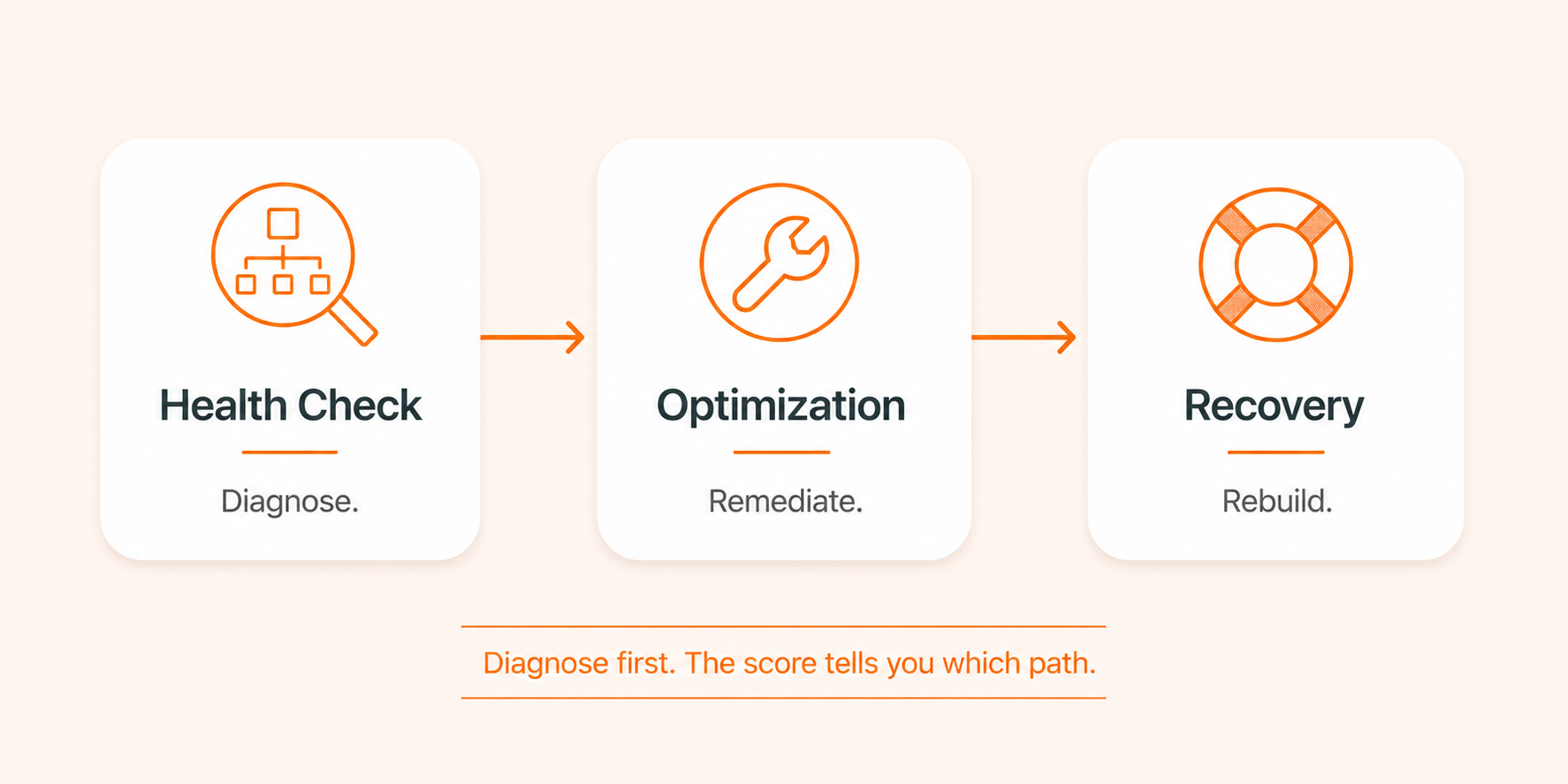
These three words get used interchangeably and should not be.
Health check is the diagnostic. Read-only, evidence-based, scored. It tells you what is wrong and how much it matters. No changes are made.
Optimization is the remediation. Tactical work dashboard tuning, search consolidation, workflow cleanup, role rationalization, license right-sizing typically delivered as a sprint or as part of managed services.
Recovery is what happens when the diagnostic reveals that optimization is not enough: broken financial close, unrecoverable data-integrity issues, a failed go-live, or core architectural decisions that have to be undone. Different scope, different timeline, different conversation.
Most NetSuite environments need optimization. A small fraction need recovery. Almost all of them benefit from a regular health check, because it is the only honest way to tell the two apart.
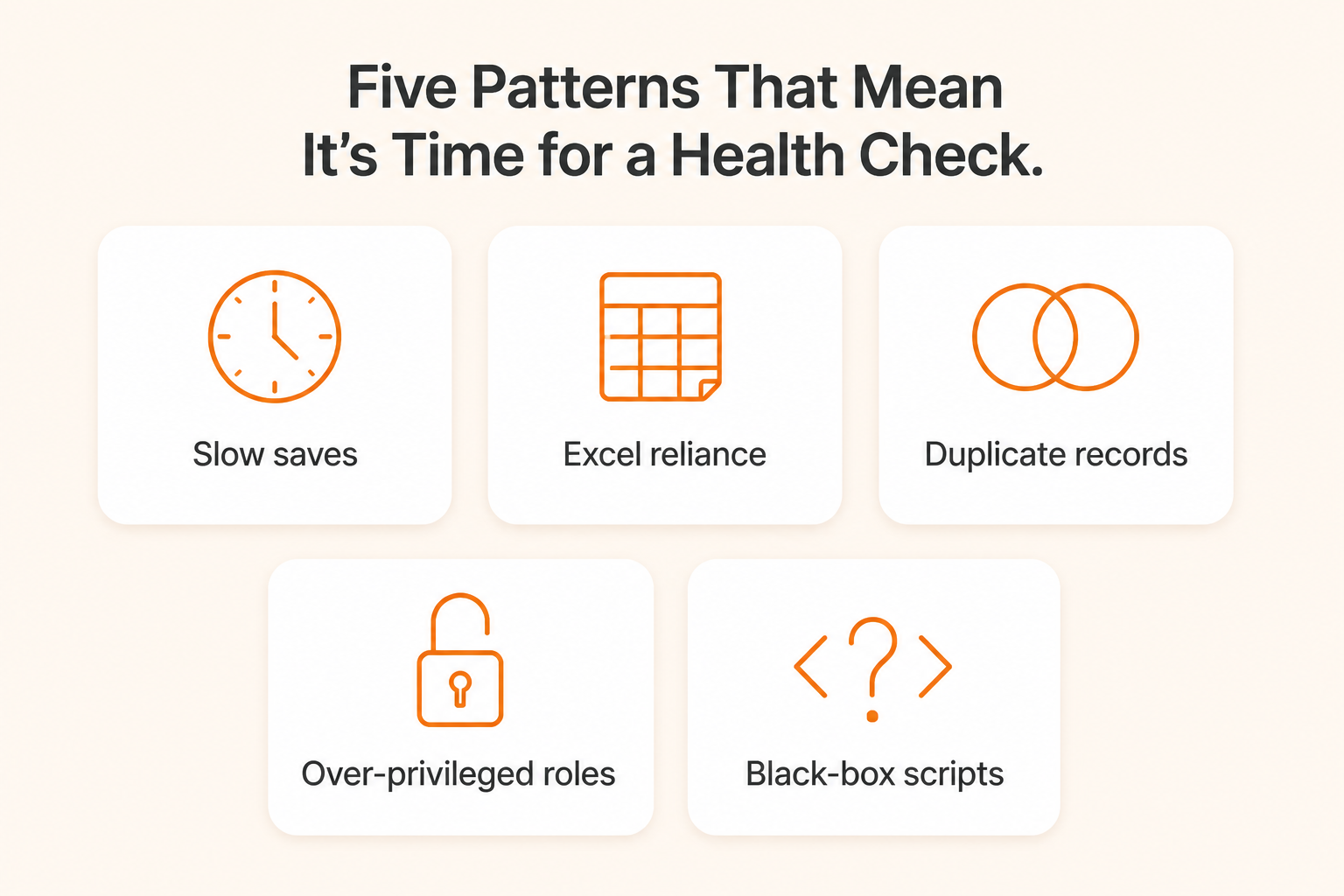
You don't need every one of these symptoms to justify a review. Three or four is usually enough.
 Performance and Usability Red Flags
Pages load slowly. Transactions take 8-10+ seconds to save. Users routinely complain that "NetSuite is slow."
Dashboards feel cluttered, with too many real-time portlets and KPI scorecards refreshing on every login.
Simple tasks require excessive clicks, dual entry, or workarounds in spreadsheets.
Process and Adoption IssuesUsers export data to Excel for reporting because they don't trust in-system reports.
Approvals, reconciliations, and billing handoffs are tracked in email or spreadsheets instead of NetSuite workflows.
New product lines, business units, or channels are handled through manual workarounds rather than proper configuration.
Data Quality ChallengesFrequent journal entries to "fix" balances or reclass errors at period end.
Duplicate customers, items, or vendors. Inconsistent naming. Orphan records.
Reports show conflicting numbers for the same metric, forcing manual reconciliation.
Security and Compliance GapsRoles are over-privileged ("Admin for everyone"), or you can't easily explain who has access to what.
Approval workflows are incomplete or routinely bypassed.
Audit prep is stressful and highly manual.
Integration and Customization PainIntegrations fail or create duplicate/missing records between NetSuite and e-commerce, WMS, CRM, or 3PL systems.
Scripts and workflows feel like a black box -- no one is sure what runs where, or why performance changed after a release.
Bulk imports and API jobs run during business hours and slow down user work.
If three or more of those resonate, you're not looking at a one-off ticket. You're looking at drift.
Configuration drift is the gradual divergence of your NetSuite setup from its documented design and from current business needs. It's almost never the result of one bad decision. It's the cumulative effect of dozens of small ones.
Common drivers include:
Ad-hoc customizations created for a single request and never revisited.
New entities, products, or channels added without updating the underlying design.
Role changes, shortcuts, and overrides that bypass original controls.
Integrations bolted on at the edges without architectural oversight.
Item, vendor, or customer data shifting over time as people fill fields differently.
Two real patterns illustrate how invisible drift can be until someone looks for it.
 Example 1: The Distributor Where Five Objects Caused Most of the Pain
A multi-entity B2B distributor went live on NetSuite via a financials-first rollout, and operational processes evolved through ad-hoc changes over several years. Users complained constantly about slowness during peak order edits. The IT team assumed they had a platform problem.
A structured health check told a different story. Three saved searches and two scheduled scripts accounted for the majority of the perceived “NetSuite slowness.” Native features the customer was already paying for Bank Feeds, Dunning, Supply Allocation were either inactive or only partially configured. Item and customer master data had drifted enough to cause reporting variance and delayed approvals. None of it required re-implementation. All of it was invisible until someone catalogued the environment end-to-end.
The remediation roadmap from that diagnostic produced a 37% reduction in monthly close time and a 48% faster order-to-cash cycle within 90 days. Finance regained roughly 12 days each month.
Example 2: The Dropship Operator Where the Real Risk Was Architecture, Not SpeedA dropship-heavy distributor running on NetSuite OneWorld looked healthy on paper. A quarterly health check confirmed that the core platform was capable and well-aligned with the business model, but it also surfaced three structural themes that had not been visible in day-to-day support tickets:
Governance over configuration. Inventory adjustments and negative stock behaviors were eroding financial clarity and control. The fix wasn't more customization. It was tightening reasons, approvals, and locations on existing native records.
Integrations as strategic infrastructure. With 98.1% of orders dropshipped and major retailers onboarding, the vendor portal and integration layer had become strategic infrastructure. Overlapping connectors, inconsistent error handling, and prior item-conversion choices were quietly inflating transaction-line volume and pushing toward a higher account tier.
Sustainable scale. Customization sprawl warranted moving to a BAU model for continuous improvement rather than reactive ticketing.
None of those were "broken." All of them mattered. And none would have surfaced from a normal support queue. They only emerged when someone scored the environment as a whole.
That's drift. And it's why a recurring health check exists.
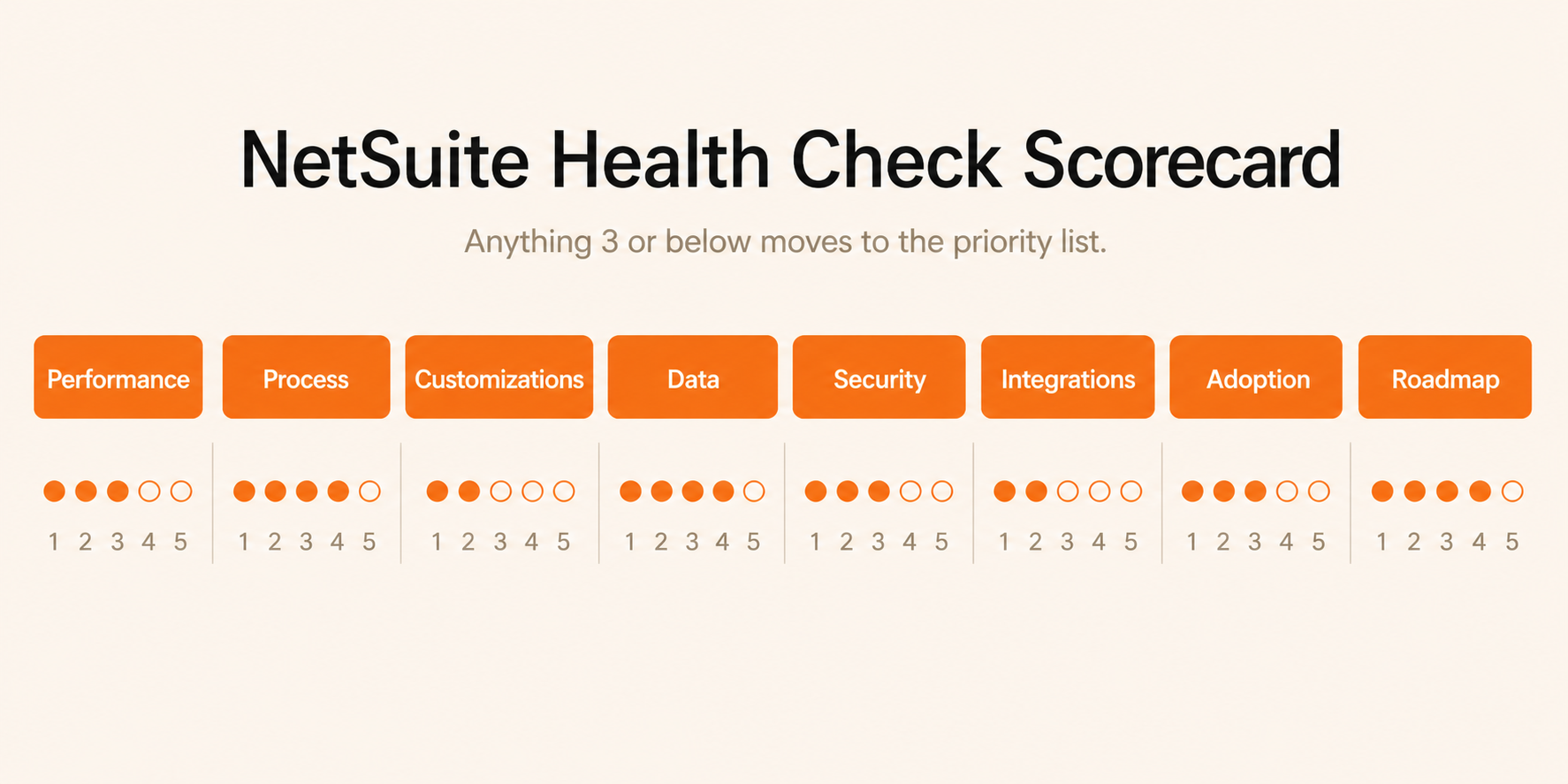
The output of a good health check is a score, not a narrative. Score each domain on a 1-5 scale (1 = critical risk, 5 = excellent). Anything 3 or below moves to the priority list.
Category | What to Evaluate | Sample Indicators | Score (1-5) |
|---|---|---|---|
Performance & Stability | Page load times, APM metrics, script performance, error rates | Median transaction load time, error logs, timeouts, user complaints | |
Process Alignment | Fit between NetSuite workflows and current business processes | Offline steps, workarounds, duplicated entry, manual approvals | |
Customizations & Scripts | Volume, quality, and governance of custom code | Orphan scripts, script failures, sandbox testing coverage, SuiteScript 1.0 footprint | |
Data Quality & Reporting | Data integrity and confidence in reporting | Duplicate records, reconciliation effort, Excel reliance | |
Security & Controls | Role design, approvals, audit support | Over-privileged roles, missing approvals, audit adjustments | |
Integrations & Data Flows | Reliability and performance of integrations | Failed jobs, manual fixes, timing conflicts, data discrepancies | |
Adoption & User Experience | User satisfaction and effective usage | Training gaps, NPS, reliance on shadow systems | |
Strategic Fit & Roadmap | Alignment to business strategy and growth | Roadmap clarity, new feature adoption, support for expansion |
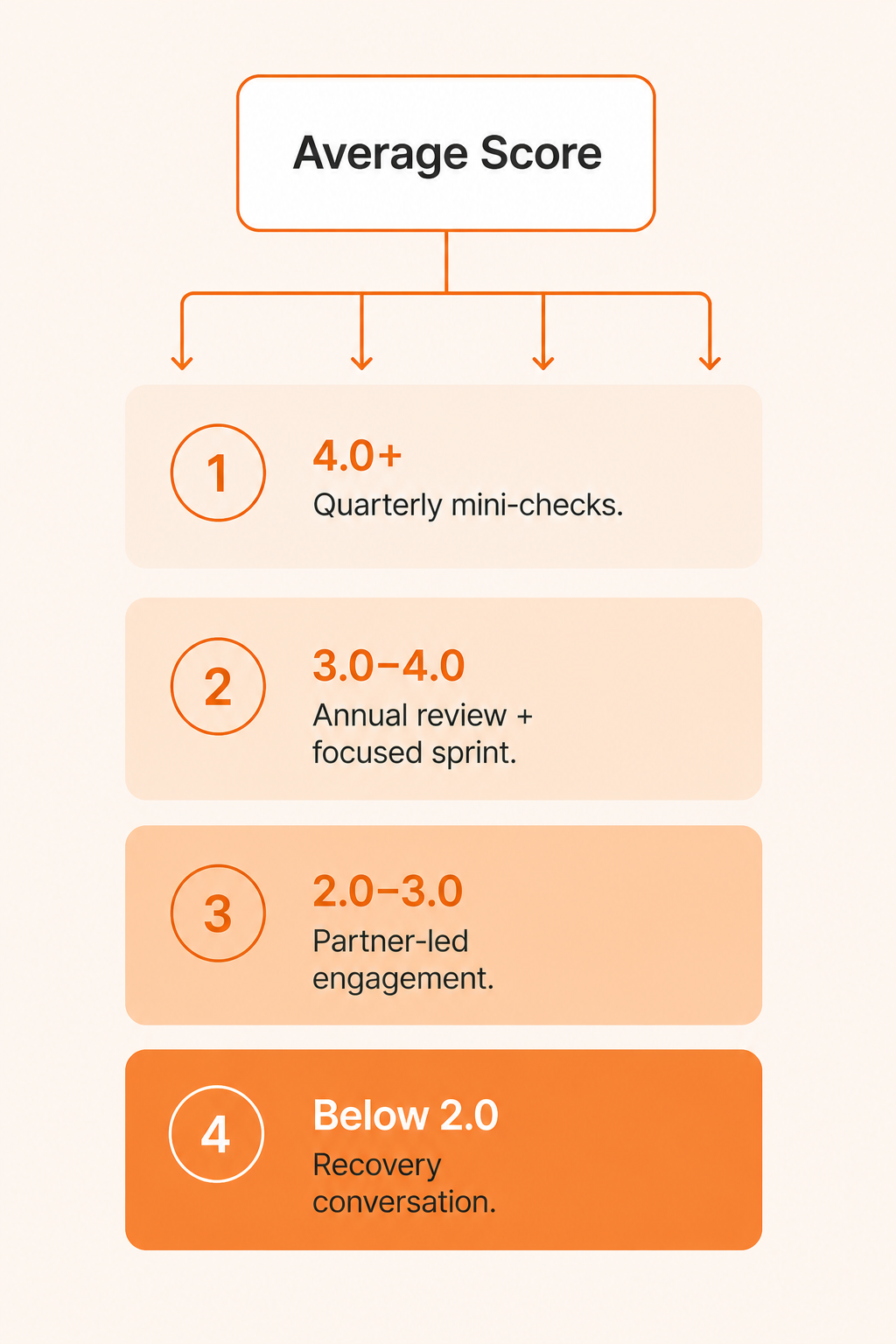
How to read the result:
Average above 4.0: well-maintained environment. Quarterly mini-checks are sufficient.
Average 3.0-4.0: typical mid-life environment with normal drift. Annual full check, focused optimization sprint to address 1-2 categories scoring lowest.
Average 2.0-3.0: significant intervention needed. Multiple categories at risk. Optimization alone may not be enough; a partner-led engagement is usually the right move.
Average below 2.0: you may be looking at a recovery scenario rather than optimization. The diagnostic is the input that tells you which conversation to have.
Cadence matters more than depth. A shallow review every quarter beats a thorough review every three years.
Annual full health check: every dimension reviewed, scorecard refreshed, roadmap rebuilt. This is the baseline for any environment more than a year post-go-live.
Quarterly mini-checks: focused on performance metrics, data quality, and critical controls. Cheap, fast, catches drift early.
Triggered reviews: any time you go through a material change.
Triggers that warrant an unscheduled health check:
Rapid growth - new subsidiaries, products, channels, or acquisitions.
A major project - revenue recognition changes, new integration, new warehouse or 3PL, new pricing model.
Approaching a tier or license boundary - transaction-line growth pushing toward an account-tier upgrade is a classic signal that optimization can pay for itself.
Rising user complaints, stalled internal roadmap, or growing manual work.
New compliance requirements or increased audit scrutiny.
Turnover in the NetSuite admin seat or change of partner. Institutional knowledge walks out the door -- a health check captures the state of the environment before that knowledge is lost.
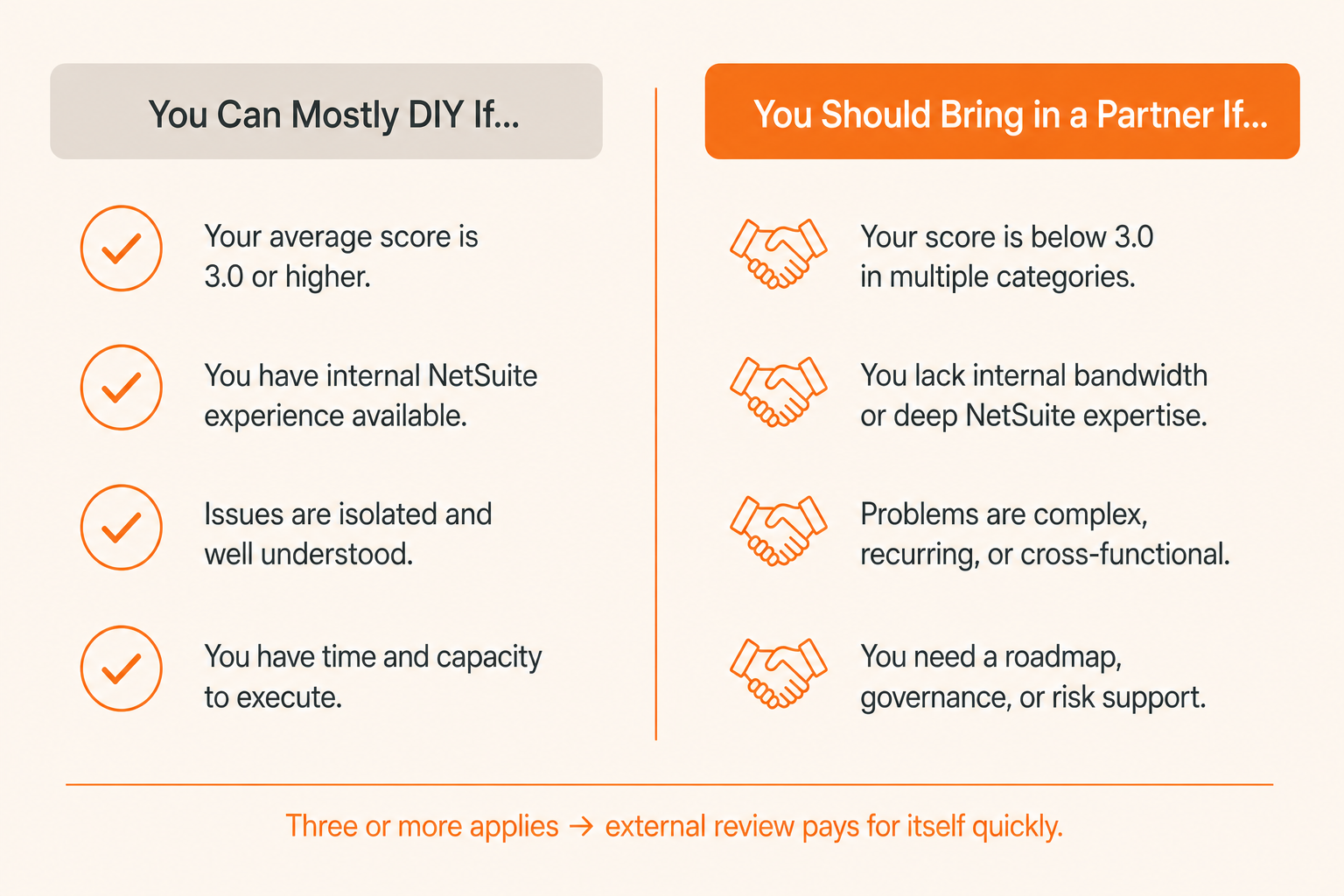
This is the question the health check is really designed to answer. The score tells you the what. This section tells you the who.
You have a dedicated, experienced NetSuite admin and engaged power users in finance and operations.
Your scripts, workflows, and integrations are well-documented and actively maintained.
Performance issues are localized and clearly tied to specific searches or workflows.
You have working sandbox discipline and a change-control process—even a lightweight one.
Your scorecard average is above 3.5 with no individual category below 3.
In that case, an internal review using NetSuite’s native tools (APM, the Performance Health Dashboard, system notes, saved searches, and SuiteAnalytics) will get you most of the way there. Treat external help as targeted: a one-off performance audit, an integration review, or a controls assessment ahead of an audit.
Performance issues are widespread or unexplained.
No one owns overall architecture. Multiple admins or past implementers have layered customizations over time.
You are planning major changes acquisitions, new revenue models, international expansion and need NetSuite to scale.
Audits are painful. Controls, documentation, and a repeatable close are missing or fragile.
Your scorecard has any category at 2 or below, or the average is below 3.0.
You are approaching a contract renewal and want defensible usage data before the conversation starts.
If three or more of those apply, an external review usually pays for itself quickly. The point of bringing in a partner is not to replace your team. It is to give them a defensible baseline and a roadmap they can actually execute.
A partner-led NetSuite health check usually unfolds in three stages: a short alignment call to scope the focus areas, the diagnostic itself (read-only, automated where possible), and a working session to interpret the findings and agree the roadmap.
The scan is the fast part. The value lives in the interpretation. For an account the partner already supports, the alignment is short and the workshop drives quickly to action. For a first-time engagement, the partner adds structured discovery sessions to learn the business model, integrations, and prior design choices before interpreting what the scan finds.
Softype runs health checks with Scout, our AI-powered NetSuite analyzer. Scout takes temporary read-only access to a NetSuite instance and systematically analyzes scripts, workflows, saved searches, custom records, roles, permissions, and configurations across the environment including across all subsidiaries for OneWorld implementations. It does not modify, delete, or write any data. It only reads configuration, customization, and metadata necessary for the assessment. It produces a structured findings report covering a risk and opportunity matrix, a prioritized action plan, and an executive summary, which a Softype Principal Consultant then walks through with you.
Two points worth being honest about:
Scout is the diagnostic, not the answer. The raw output is a complete picture of what is in the environment. Translating that into business decisions requires a consultant who understands your operations, integrations, and roadmap. Handing a customer the report without that walkthrough produces frustration, not insight.
Scout’s value is in coverage and consistency. A human consultant clicking through hundreds of screens will miss things and will produce a different report each time. Scout produces the same complete inventory every time, which is what makes scoring across categories and across customers meaningful.
For existing Softype customers, Scout has been used to identify feature utilization, unused features, and usage differences across subsidiaries, translating directly into improvement roadmaps without re-implementation. For environments where Softype is not the original implementer, Scout’s neutral, evidence-based approach is the basis for a remediation roadmap rather than a finger-pointing exercise.
The fee for a Scout-driven health check is deducted from any follow-on work that comes out of it. The point is to lower the barrier to a clear-eyed look at your environment, not to sell you a report.
A health check is only useful if it leads to action. The typical post-diagnostic path:
Quick wins (weeks 1 to 4). Top-priority items from the scorecard, usually search tuning, dashboard cleanup, and role rationalization. Low-risk, high-visibility, helps fund the rest.
Optimization sprint (weeks 4 to 12). The tactical work. Workflow consolidation, SuiteScript hygiene, integration hardening, license right-sizing ahead of renewal. This is where the NetSuite Optimization playbook applies in full.
Governance and BAU (ongoing). Quarterly mini-checks, change-control discipline, and an enhancement backlog owned by a named team. The point of the health check isn't a one-time fix. It's the start of a recurring cadence.
For organizations whose diagnostic uncovers structural issues, such as failed go-live patterns, unrecoverable data, or controls gaps that an audit would flag, the path forks toward NetSuite Recovery rather than optimization.
NetSuite problems usually appear as creeping patterns, not single failures.
A health check is a read-only diagnostic that produces a scored picture and a prioritized roadmap.
Configuration drift is the silent accumulation of small changes that slowly degrade performance, controls, and trust in the numbers.
Score the environment across eight categories; anything 3 or below becomes a priority.
Annual full checks plus quarterly mini-checks catch drift early; triggered reviews after major change are essential.
DIY works when you have strong internal ownership and a healthy scorecard; bring in a partner when architecture is unclear, issues are widespread, or scores are low.
The diagnostic is only valuable if it leads to action quick wins, a focused optimization sprint, and ongoing governance.

A health check is the diagnostic. Read-only, scored, no changes made. Optimization is the remediation work that follows. You can run an optimization sprint without a health check, but you'll usually fix the wrong things first. The check exists to tell you what to prioritize.
The diagnostic itself is fast. Scout's read-only scan runs in hours, not weeks, and produces a complete inventory of scripts, workflows, searches, customizations, and configurations. The longer part is the interpretation: a consultant walking the findings against your business, validating priorities, and shaping the roadmap. Plan for a short alignment call up front, the scan, and a working session within roughly two weeks of access being granted.
No. The diagnostic phase is read-only and runs against production using logs, APM, saved searches, and configuration reviews during normal operations. Any changes that emerge from the roadmap are tested in sandbox and deployed in low-usage windows.
Annual full review, quarterly mini-checks on performance and data quality, and a triggered review after any major event (acquisition, new integration, regulatory change, leadership change in the NetSuite team, or approaching a tier boundary).
Often, yes. Audits routinely uncover unused modules, redundant customizations, over-provisioned roles, and integration inefficiency. Right-sizing those, and avoiding tier upgrades you don't actually need, typically pays for the engagement on its own. Time it 6 to 9 months before contract renewal so you have defensible usage data before the negotiation starts.
That's the point of doing it. A scorecard average below 2.0, or any single category at 1, usually means optimization alone won't be enough, and the conversation shifts to recovery. Better to have that conversation now, with data, than to find out during an audit or a tier escalation.


Helping businesses thrive with integrated ERP solutions.
NetSuite
Service
Company
Contact Us
Copyright © 2026


